
Timeline
Tools
Role
Overview
3 weeks
Figma
Figma Make
Supabase
Flowise
Worktrip Autopilot is a vibe-coded agentic group work-travel coordinator for teams, autonomously plans, books, and manages trips within company policy. As a product designer, I explored how AI can accelerate UX iteration and deepen product feasibility. This experience empowered me with the skills to design sophisticated AI agents, evaluate technical trade-offs, and prove the tangible business value of automated user experiences.
Balancing AI Agency and User Control in Booking Worktrips
AI Product design, User testing, Prototyping, Vide-coding
Team
1 Product designer (Me)
1 Software engineer


Leveraging AI in design process
This project explored how AI can be integrated into the product design lifecycle to support ideation, research synthesis, rapid-prototyping, and iteration. By using AI, I was able to experiment faster, make more informed decisions and collaborate across disciplines while keeping user needs at the center.




One-click agentic AI that autonomously plans,
books, and manages trips within company policy
The goal
Companies and employees spend hours coordinating business travel across disconnected tools, unclear policies, and constant changes which creates friction and wasted time.
Problem Statement
How might we simplify booking business travel by turning complex multi-step planning into a seamless experience?
Reduced task completion time
AI credibility score
Higher confidence rating in clicking "Book & Confirm"
Task efficiency
Increased subjective trust score
Confidence rating
Impact/Outcome
65%
28%
40%
Provide Initial Intent
Start by sharing basic travel needs in natural language, such as destination, dates, budget, or general preferences. The agent interprets this input and identifies the key details it needs to begin planning.
Agentic Planning
The agent searches, books flights and hotels, ensuring all options are in-policy. It synthesizes the best itinerary based on team cohesion, cost, user’s preference and tendency.
Review & Confirm
Check individual travel plans, track budget usage, view agent summaries, and adjust trip by comparing with other options based on alternative preferences.



Define
Ideate
Prototype
Test
Prototype
Test
Accelerated
User Testing
Desk Research
Generating PRD
Value Proposition
Idea Evaluation
Setting Design Direction
Reference Research
User Interview
UI Visualization
Prototyping Interactions
Connecting Backend Logic
UX Writing
Design Process
How AI Changed Design Process
Initial Approach
Innovative AI Product Ideation: Matchmaking Process
I utilized a AI-driven matchmaking framework to navigate the vast landscape of AI innovation, generating 50+ initial concepts to one high-potential product. Each idea was evaluated against a strict criteria of market need and technical readiness, ensuring the final direction addressed a genuine user pain point while remaining financially sustainable for the enterprise.
Matchmaking Idea Rating
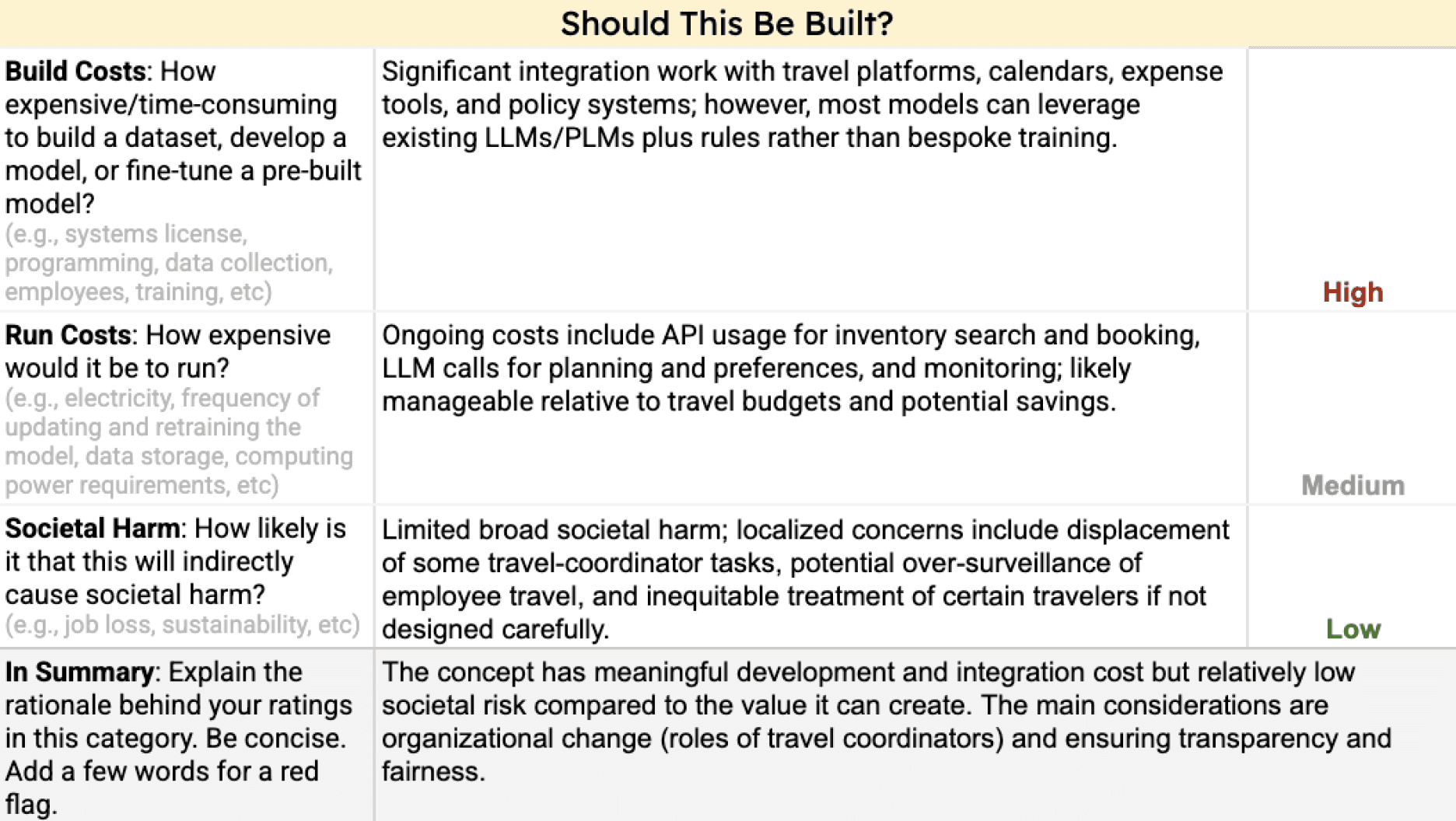
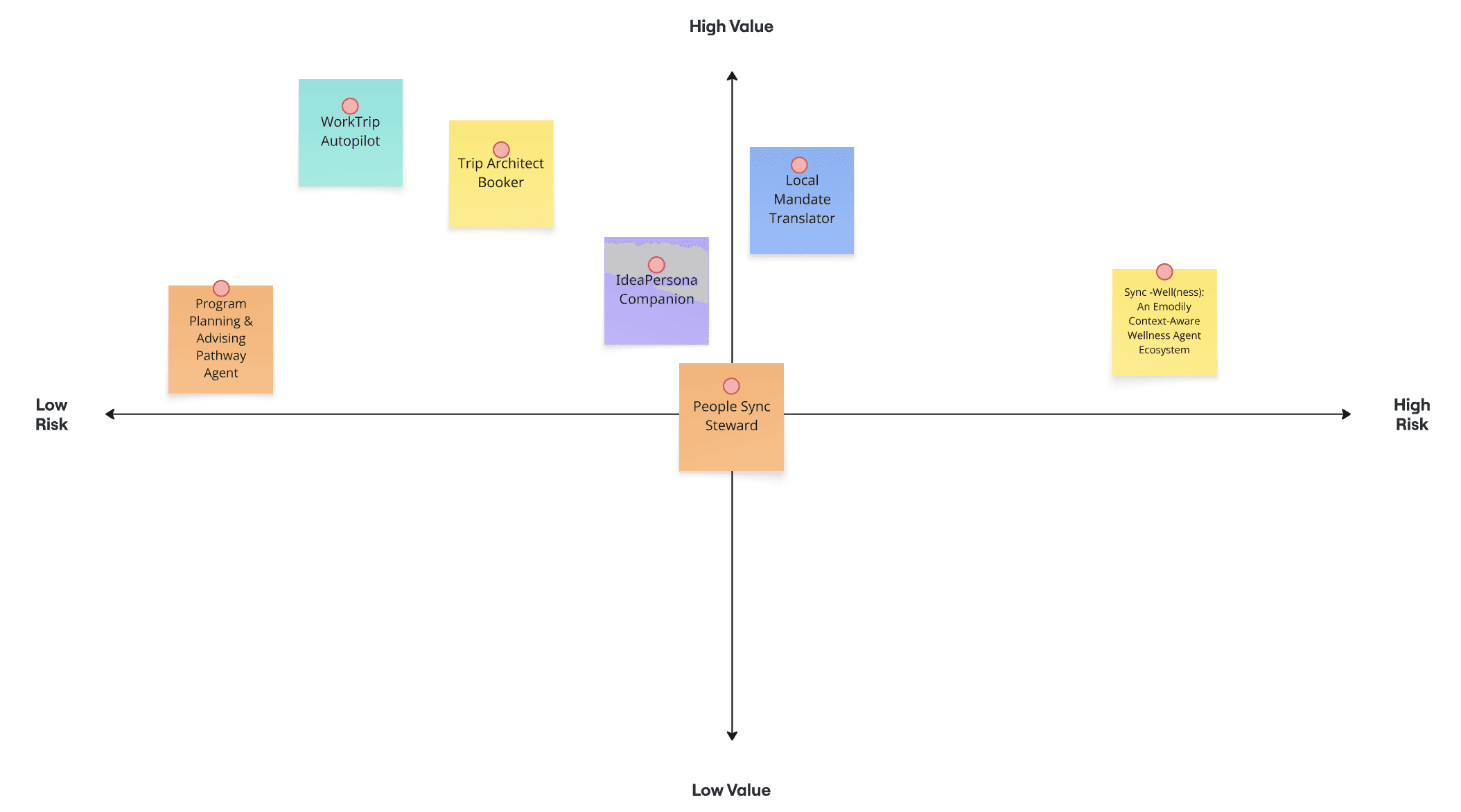
Risk/Benefit Matrix
Understanding Stakeholders
Stakeholders Needs & Value Proposition
End Users
Business Travelers
Needs
Task
Book complex group or individual travel abiding by company policy
Removal of administrative friction and wasted time
Payer
Corporate Travel Managers
Needs
Task
Manage total travel costs, ensure policy compliance, and oversee system integrations
Reduced labor hours and increased policy adherence
Servicing Stakeholders
Internal Teams
(Finance/IT/HR/Legal)
Needs
Task
Set the policies, manage backend API infrastructure, and audit expense data
Compliance with labor laws and company travel standards
User Preferences,
Trip Details
AI Agent
Planning & Acting
Travel booking systems flights, Hotels
Itineraries,
expense reports
corporate systems
policies, hR, expenses
User waits 10 seconds
User clicks ONE button:
"Confirm & Complete booking” (or selects an alternative ).
"Book trip from Pittsburgh to
New York from March 2-5.
The purpose is for a conference"
User Flow
Service blueprint
User Feedback
Major Pain Points from the User
Low trust in system recommendations
01
How much do you trust the options? (2.75/5)
Hesitation at the final “Book & Confirm” step
How confident are you clicking ‘confirm and book’? (3/5)
02
03
Limited control over customization
After user testing version 2, I found 3 major pain points.
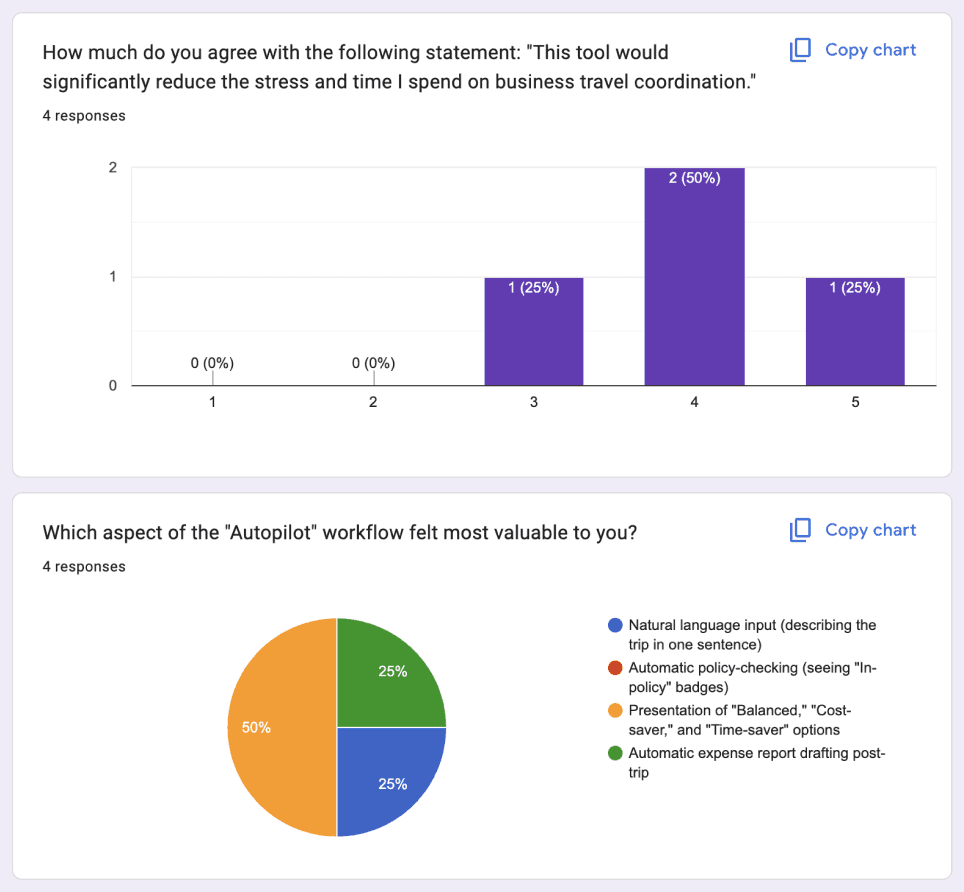
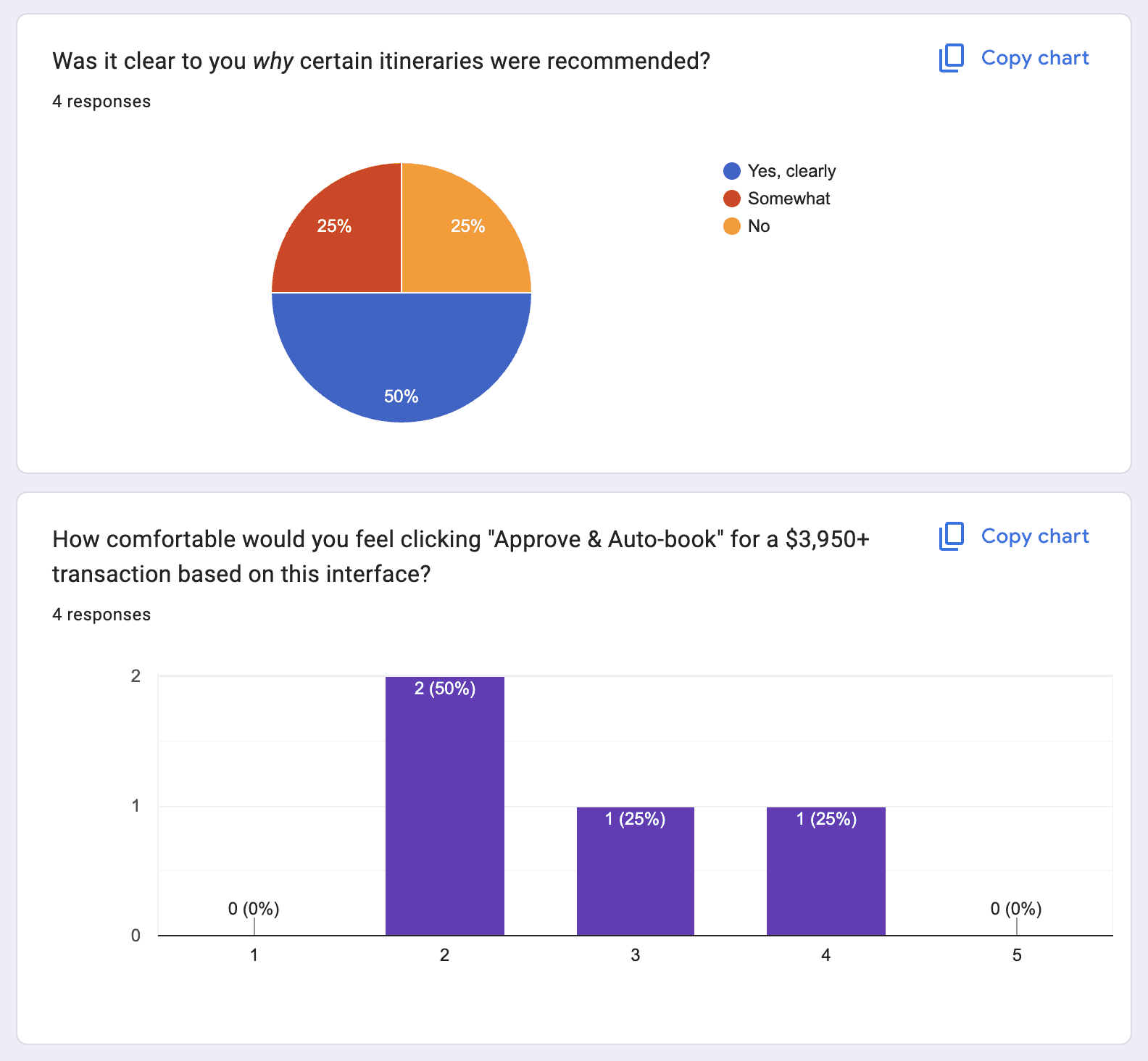
“I hope the itineraries are more micro adjustable. ( I can change my flight to cheaper one. Change my hotel location, etc...)”
Thanks to vibe coding, I was able iterate on 4 versions within 1 month. Using Figma make and connecting APIs, I was able to get more accurate user experience feedback and it allowed quick iteration. For version 1,2, screen structure and flow was on focus, and as it gets updated to version 3 and 4, I enhanced AI agent usability as well.
Prototype Process
Rapid Prototyping Using Figma Make
Version 1
Basics
Travelers’
Guidelines
3
Preferences
4
Options
5
Confirm
Travelers’ Survey
Select which sections travelers will be asked to complete
Flight times
*
Seat & mobility
Hotel preferences
*
Room sharing
Accessibility
*
Food & dietary restrictions
*
Free time / exploration
Invite travelers now
Travelers will receive an email with the survey link
Survey Preview
Traveler view
Flight times
Preferred departure time
Morning
Afternoon
Evening
Flexible
Comfort vs. Cost preference
Lower cost
More comfort
Hotel preferences
Distance from venue
Walking distance preferred
Up to 15 minutes travel
Up to 30 minutes travel
Flexible
Walking Distance Mostly Preferred
Accessibility
*
Wheelchair accessible room
Visual accommodations
Hearing accommodations
Other (please specify)
Food & dietary restrictions
Vegetarian
Vegan
Gluten-free
Dairy-free
Nut allergy
Kosher
Halal
I'd like to explore local restaurants within per-diem
Back
Next
✈
WorkTrip Autopilot
Trips

Bookings
Expenses
Version 2
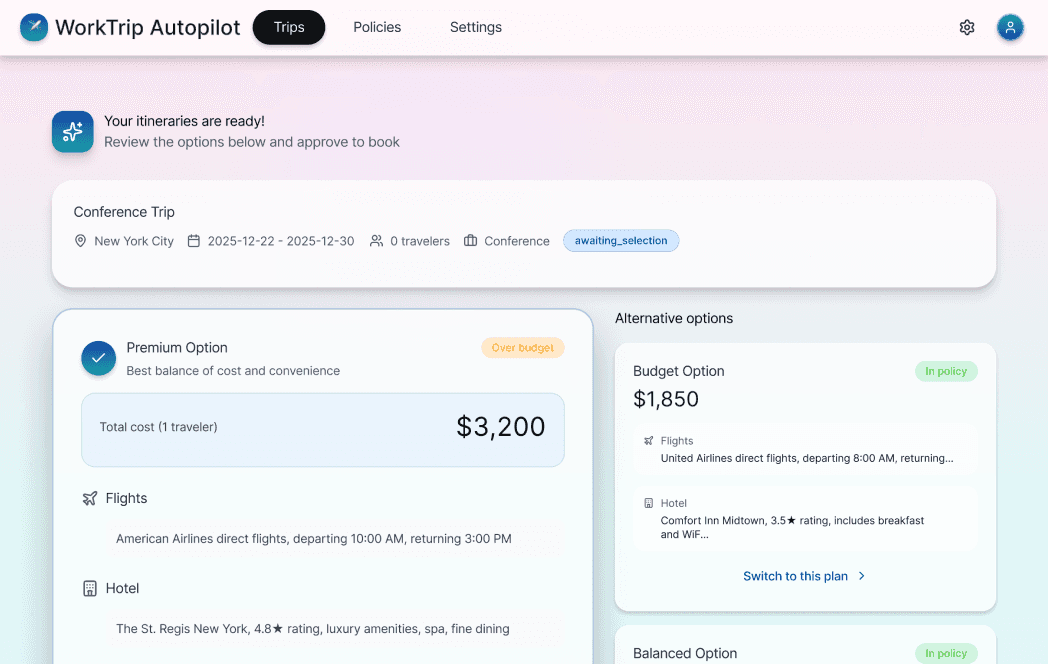
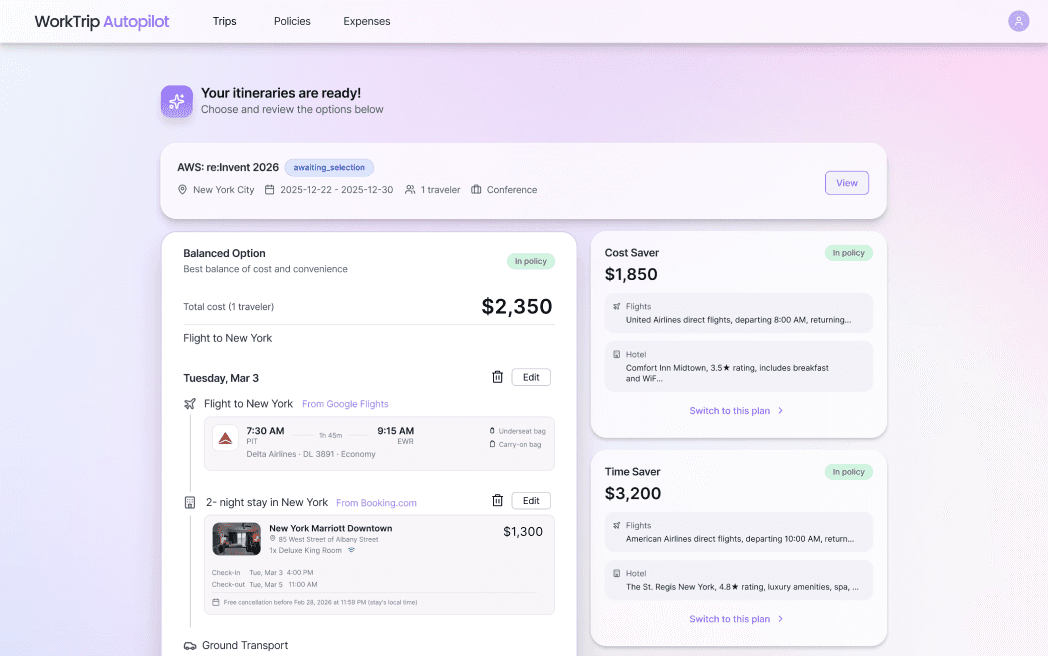
Version 3
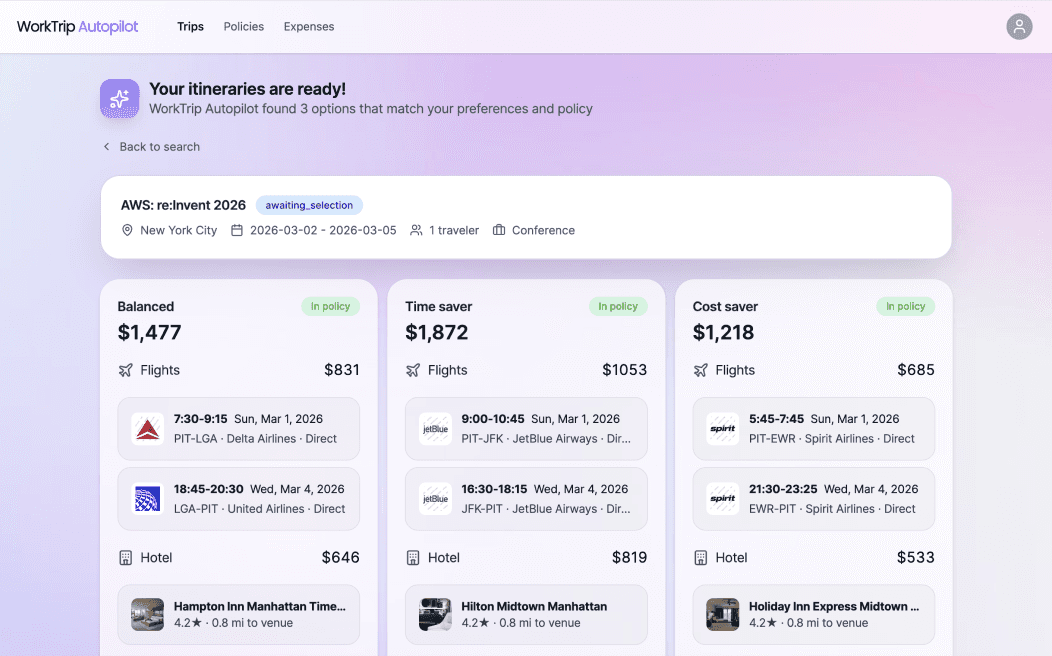
Version 4
User manually enters all details across 5 separate screens.
(Trip Basics, Travelers, Preferences, Itinerary Options, Confirm & Book).
The system captures user intent in the background. User’s role gets simplified into approval and review.
(Intent Input, Choose & Edit itinerary, Confirm & Book)
User provides minimal input
Agent handles autonomously based on user data
Switching to Human Driven to
AI-Driven Agentic Flow
Task efficiency 65%
Ver 1
Human Driven, Step by Step process (5 steps)
AI Driven, Human Evaluates (3 steps)
Ver 2
Design Decision 1
I simplified the initial flow by reducing the user’s role to reviewing and approving the itinerary, while allowing the system to manage the intermediate steps. This helped create a more agent-like experience and lowered friction.
Too much input options
Too much information to go over
To help users feel more confident in their decisions, I focused on restructuring the user flow at the screen level. Instead of hiding the editing function behind a button within the itinerary-selection step, I surfaced editing as a dedicated step and guided users into a separate editing screen. This made the ability to fine-tune their itinerary more explicit and encouraged users to review their choices in greater detail, reducing hesitation when confirming the booking.
Editing capability was not discoverable
Users overlooked that itineraries were manually adjustable
Low confidence before proceeding to booking
Naturally prompted to review their itinerary once more
Editing capabilities are explicit and easier to understand
Smoother, more intentional flow leading into booking
Increased confidence through double-checking of details
Making users more confident clicking ‘Confirm and Complete booking’
Design Decision 2
Confidence rating 40%
Combined Itinerary Selection & Editing
Ver 3
Dedicated Editing Step Before Booking
Ver 4
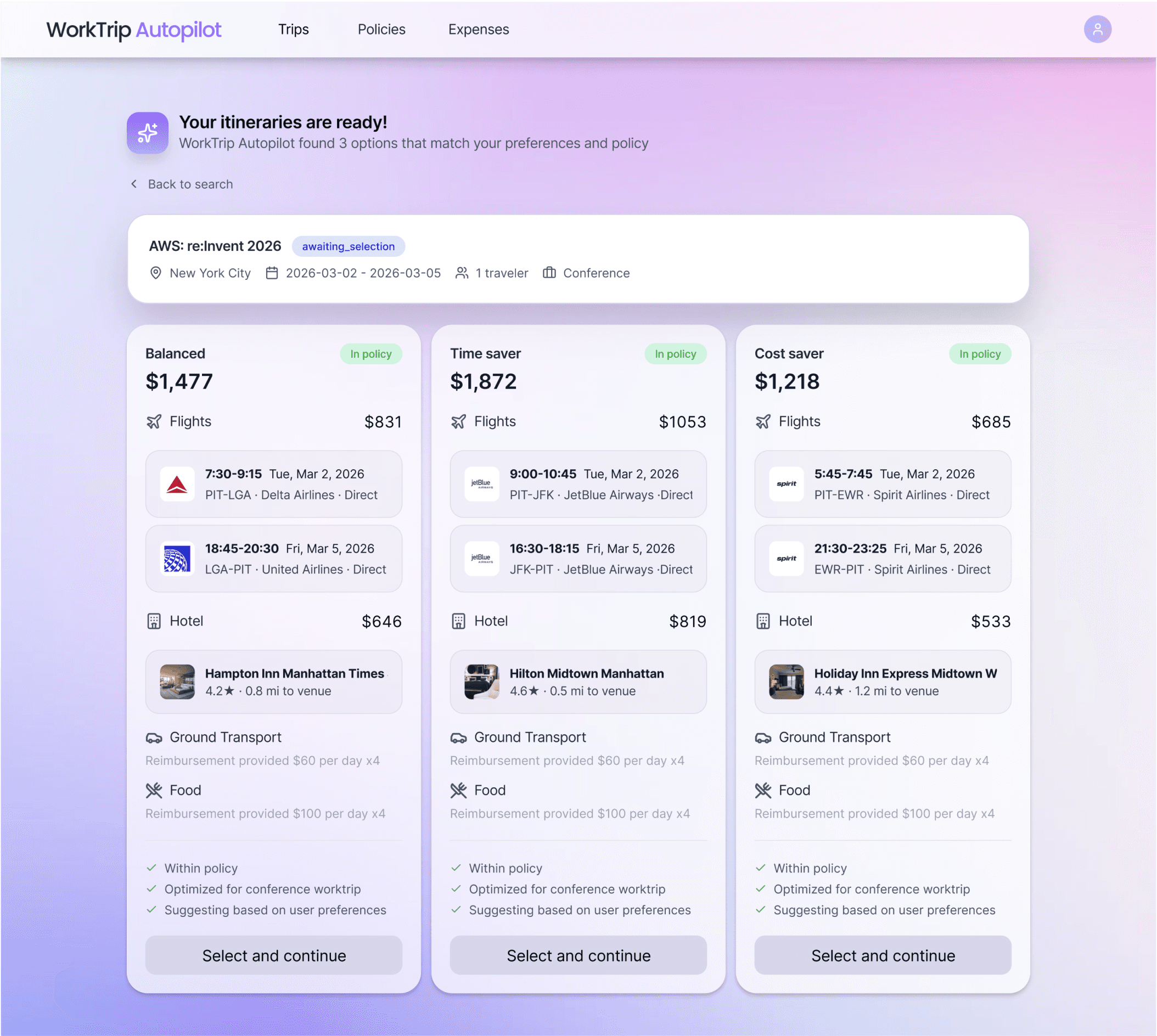
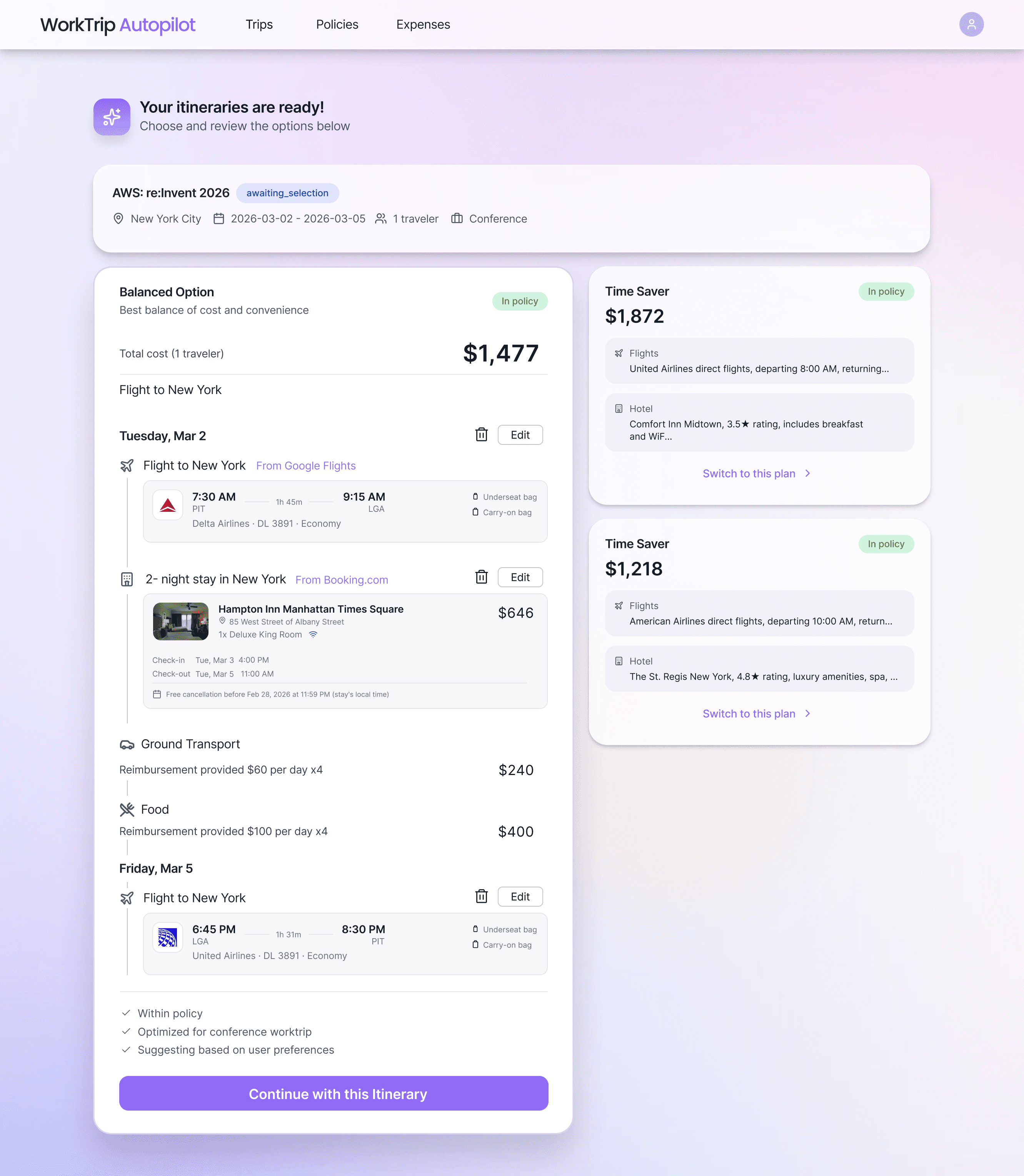
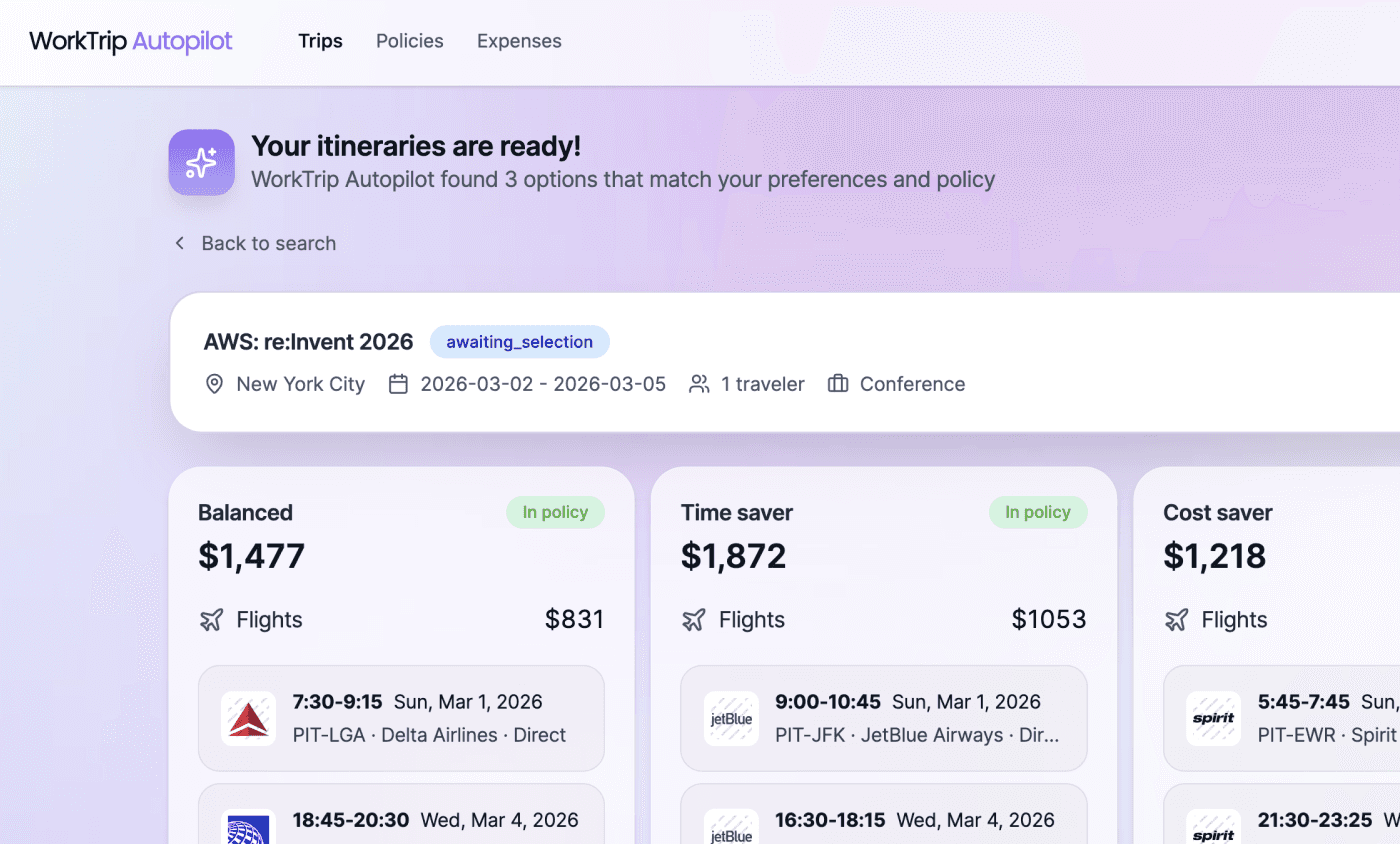
For the itinerary card UI, I used a 3-column layout to present all options with equal visual weight, avoiding unintended hierarchy and enabling quick side-by-side comparison. Since the user’s goal at this stage is to select a high-level itinerary direction, this layout helps users evaluate options at a glance without cognitive overload. I intentionally removed detailed information such as check-in times or baggage policies, keeping the focus on overall travel structure rather than operational details.
Simplified Option Cards
Ver 4
Allows itinerary cards to have essential information only
Enables faster, more confident decision-making
Enables clear, side-by-side comparison across options
Detailed Single-Option
Ver 3
Each itinerary card contains too many detailed elements
Additional click is required to switch itinerary cards
Creates unintended visual hierarchy among options
Establishing AI Credibility:
Bridging the Trust Gap
Trust score 28%
Another problem to be addressed was user’s perception of low credibility and AI reliability. To give more trust behind the itinerary suggestions and overall system, I made design measures throughout the service.
Design Decision 3
Reassurance copy
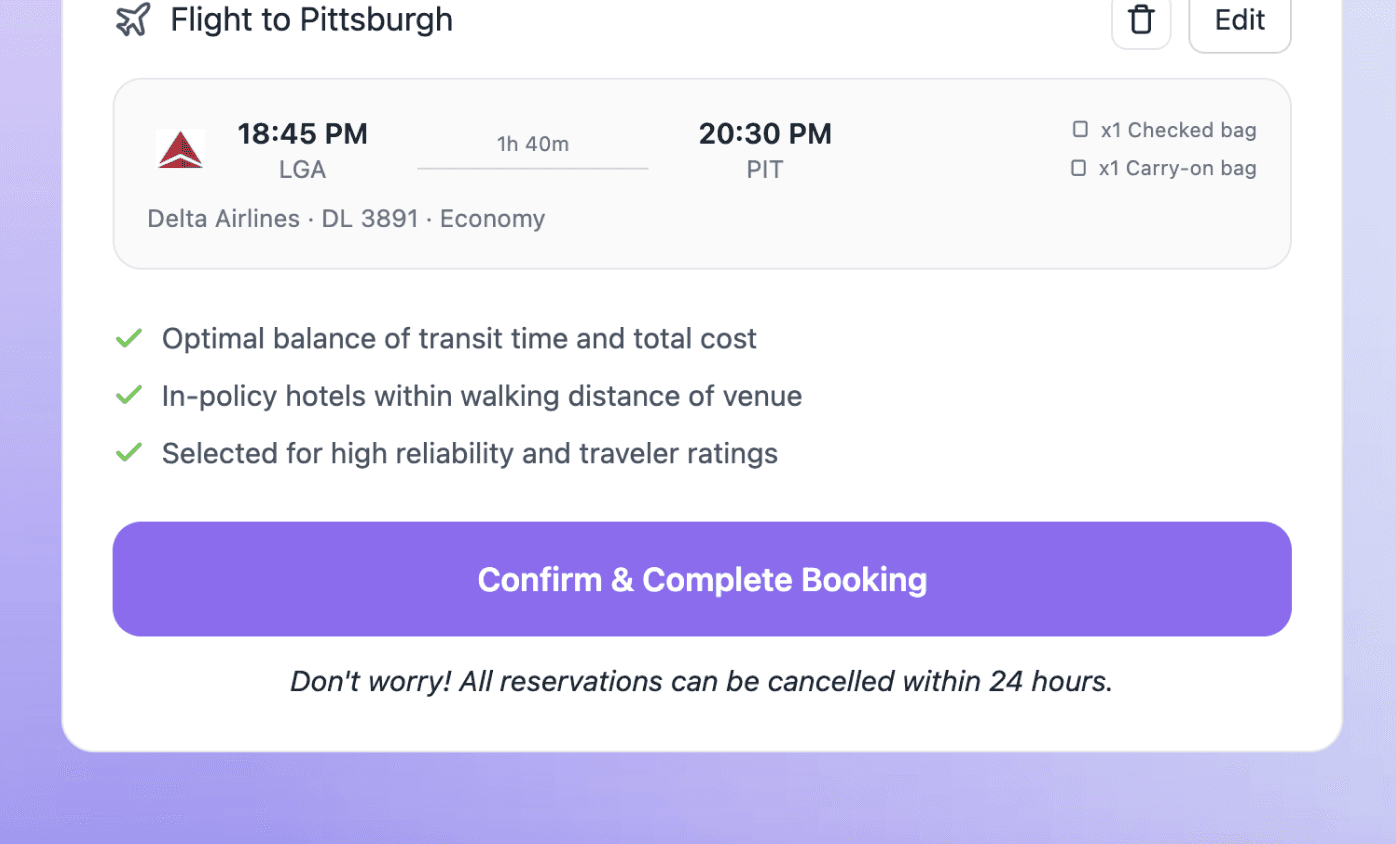
Explainable AI Suggestions
Real-time Compliance Assurance
Redesigning Spend Visibility for Policy Compliance
Design Decision 4
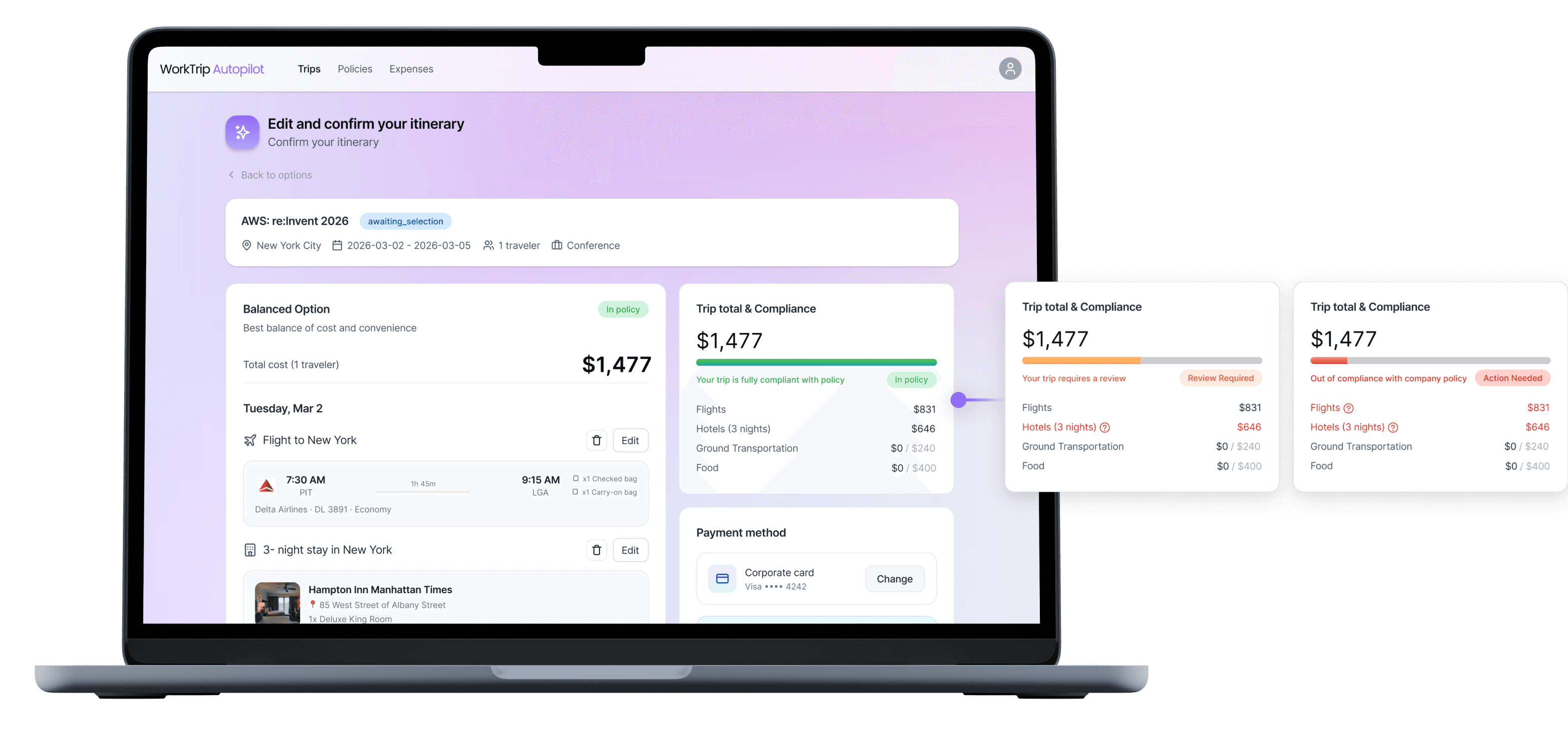
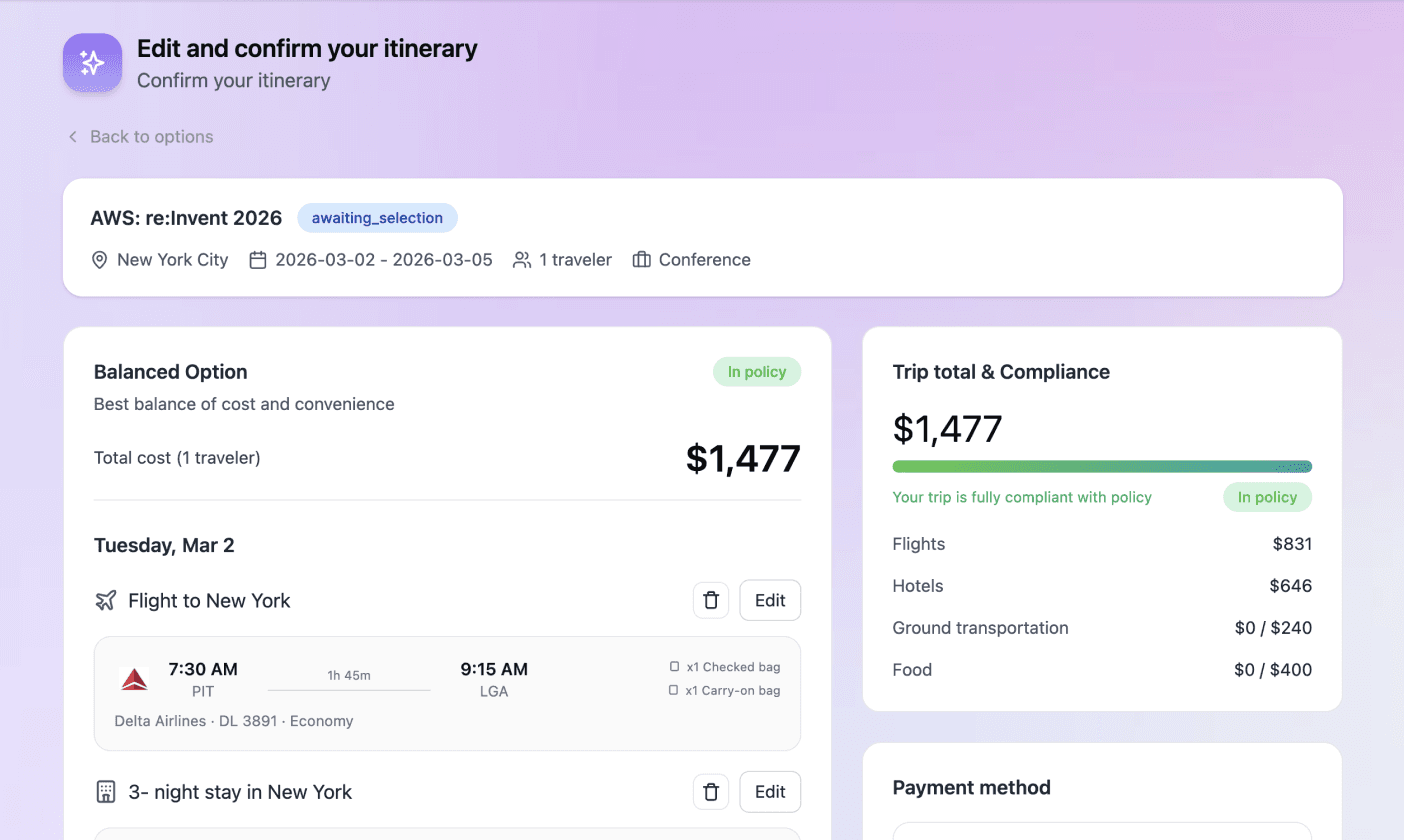
The initial Figma Make–generated design emphasized total trip budget, but user research showed that companies enforce spending through category-level policies rather than a single cap. So I redesigned the interface to prioritize policy compliance, replacing budget-centric elements with a policy-driven visualization. While retaining the graph bar to show total spend, the updated design now intuitively highlights whether the itinerary meets specific company guardrails.
Budget & Spend
$1,477
of $2,500

94% used
In policy
Flights
$831
Hotels (3 nights)
$646
Ground Transportation
$0
Food
$0
Budget-Centered Itinerary View
Before
Policy-Driven Compliance View
After



Deliverable
Final Prototype
Financial Viability
Business Opportunity
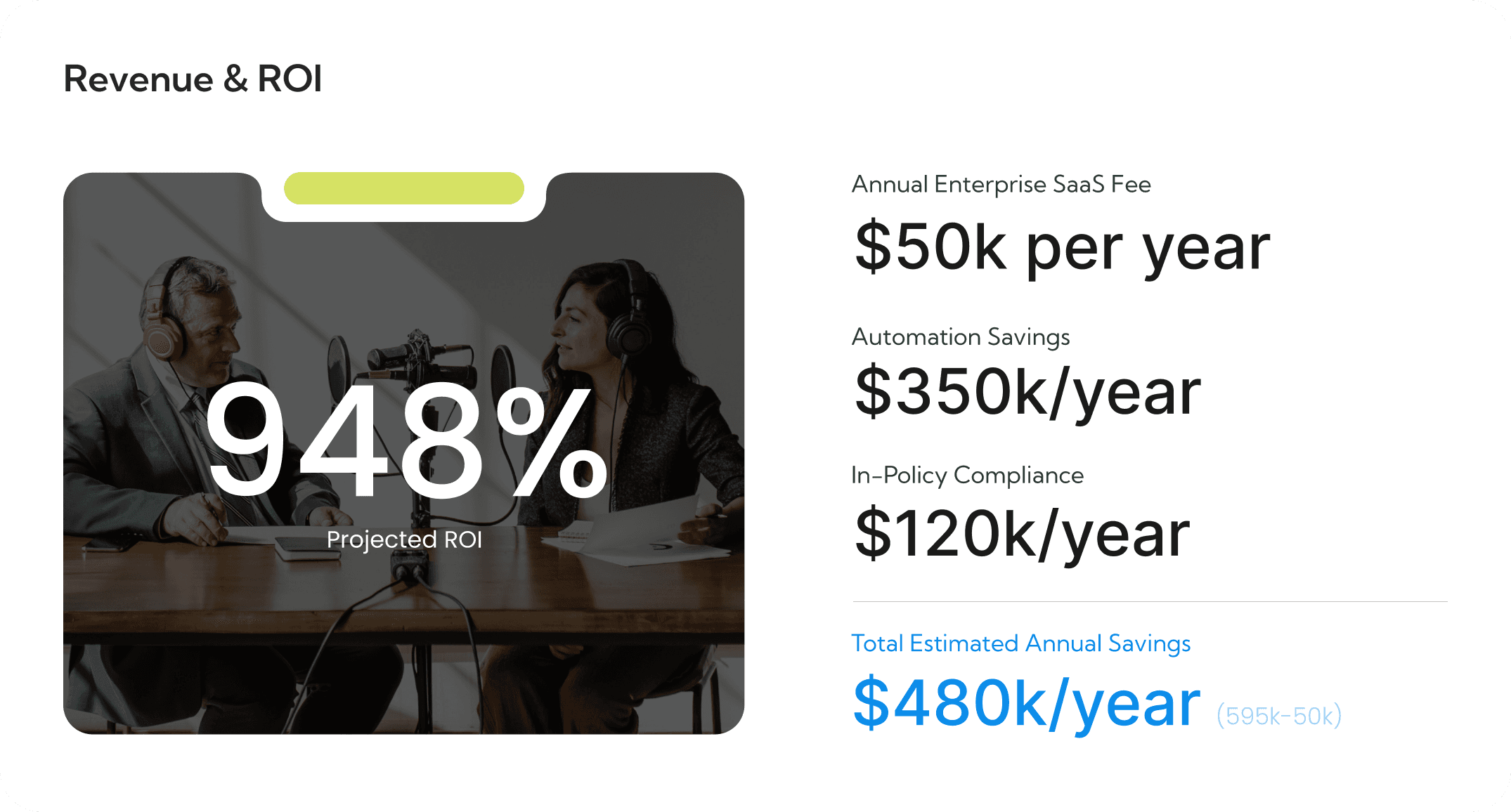
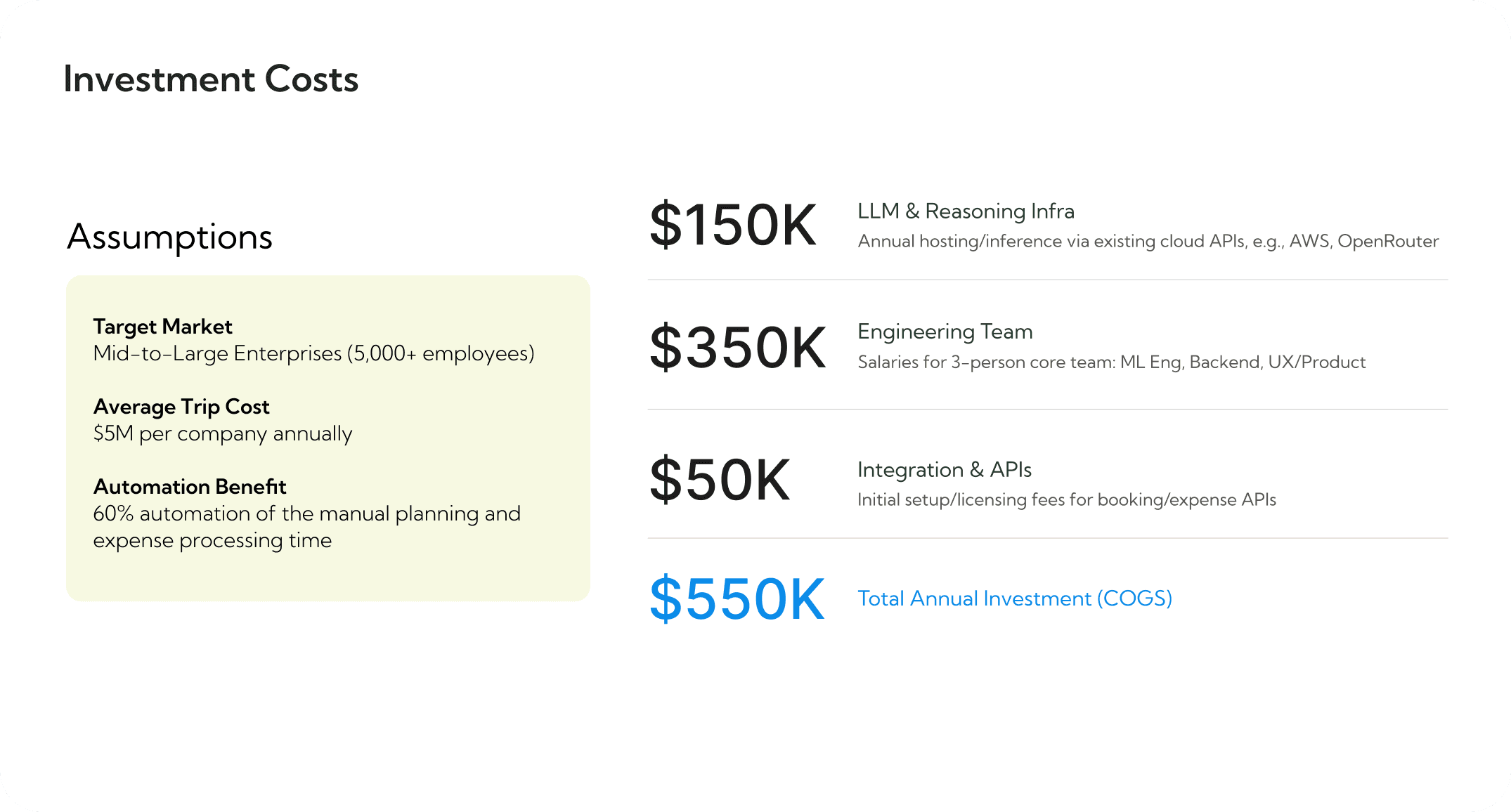
With the help of AI, I modeled the opportunity by defining a conservative 3% adoption within our target market: Mid-to-Large Enterprises (5,000+ employees). The cornerstone of our value proposition is the assumption that the Agentic AI can deliver a 70% Automation Benefit of the manual planning and expense processing time.
Takeaway
Learnings
This project reshaped how I approach AI-driven products, shifting my focus from feature design to designing trust, decision boundaries, and human–agent collaboration.
• Learning through iterative Vibe Coding
Through extensive trial and error with vibe coding, I developed a stronger intuition for effective prompting and learned how prompt structure directly influences system behavior. Along the way, I gained an unexpected but valuable understanding of front-end code structure, enabling me to make basic UI adjustments independently and collaborate more effectively with engineers.
• Balancing business constraints and user value
This project highlighted the tension between corporate objectives and employee needs. While companies aim to minimize costs, users seek options that maximize quality of life within given constraints. Designing Worktrip Autopilot required carefully balancing these competing priorities and translating them into UI decisions that felt fair, transparent, and user-centered.
• AI agent autonomy vs. user trust
I explored how much autonomy an AI agent should have when handling high-stakes tasks like travel and expenses. Excessive autonomy reduced user trust, especially when financial decisions were involved, while insufficient autonomy increased cognitive load and disengagement. Through this project, I learned how to calibrate agent autonomy to maintain trust while meaningfully reducing user effort.
If expanded further, I would explore adaptive agent autonomy that changes based on user confidence, behavior, and past interactions.